You know the moment.
It’s 4:47pm on a Thursday. You shipped the homepage staging link at noon. Your client, who has been mysteriously silent for six business days, has just sent you a message titled “small tweaks 🙂”.
Inside that message: a Word doc. Inside the Word doc: seven screenshots, three of which are of the wrong page. Inside the screenshots: red arrows drawn in MS Paint. Beside the screenshots: sentences like “can we make this pop more” and “the button should feel more them, you know?”
Then the follow-up email: “Also Janet from accounting had some thoughts, I’ll forward.”
Then the Slack message: “Did you see my email?”
Then the text: “Did you see my Slack?”
Then, nine minutes later, a Loom video. It is fourteen minutes long. The audio is their dog.
This is the modern client feedback process. It is a war crime. And the worst part is we built it ourselves.
The chasing feedback loop is a tax on your business
Let’s do the math nobody wants to do.
Every round of feedback that lives across email, Slack, screenshots, Word docs, and verbal phone calls costs you somewhere between 45 minutes and 2 hours of pure translation work. Not design work. Translation. You’re decoding “make it pop” into hex codes. You’re matching “the thing on that page” to a specific div. You’re cross-referencing Janet’s thoughts against the client’s thoughts against the thoughts the client had last Tuesday that contradict both.
Multiply that by three rounds of revisions. Multiply that by every active project. Multiply that by the fact that half your week is now archaeology.
That’s not a workflow problem. That’s a revenue problem wearing a workflow costume.
Why screenshots are the herpes of client communication
Screenshots feel productive. They are not productive. They are a coping mechanism.
A screenshot strips context. It freezes a moment of a living, breathing webpage and turns it into a static artifact that no longer corresponds to anything in your actual codebase. By the time the client sends it, you’ve already pushed two updates. Now you’re hunting for the version of the page that matches the screenshot, on the device the client used, at the screen width they had open, in the browser they were probably using but didn’t mention.
It gets worse. Screenshots can’t be clicked. Screenshots don’t know what element they’re showing. Screenshots can’t tell you whether the client is annoyed about the H1 or the section underneath the H1 that the H1 happens to be sitting on top of. You have to guess. You will guess wrong. The client will be mildly insulted that you guessed wrong, because to them it was obvious.
And when there are five screenshots? Now you have a scavenger hunt with no map.
The “did you get my feedback” doom loop
Here’s the part that actually breaks people.
You finish a round of revisions. You send the updated link. You wait. The client says nothing. Three days pass. You send a polite nudge. Two more days pass. You send a less polite nudge. The client replies: “Oh sorry, I sent feedback last week, did you not get it?”
They did not send feedback last week. Or they did, but it was in the third reply of a thread about a totally different invoice. Or they verbally mentioned it on a call you weren’t on. Or they told Janet to tell you and Janet forgot.
There is no source of truth. There is no inbox for “feedback on this specific page.” There is just vibes, and the slowly compounding anxiety of not knowing whether the project is moving forward or quietly dying.
Tools exist. Most of them are also a problem.
Okay, so the market noticed. There are tools now. Let’s be honest about them.
BugHerd, Pastel, Markup.io, Ruttl — these all solve a real piece of the problem. They let clients click on a thing and leave a comment on the thing. Beautiful. The screenshot era is over.
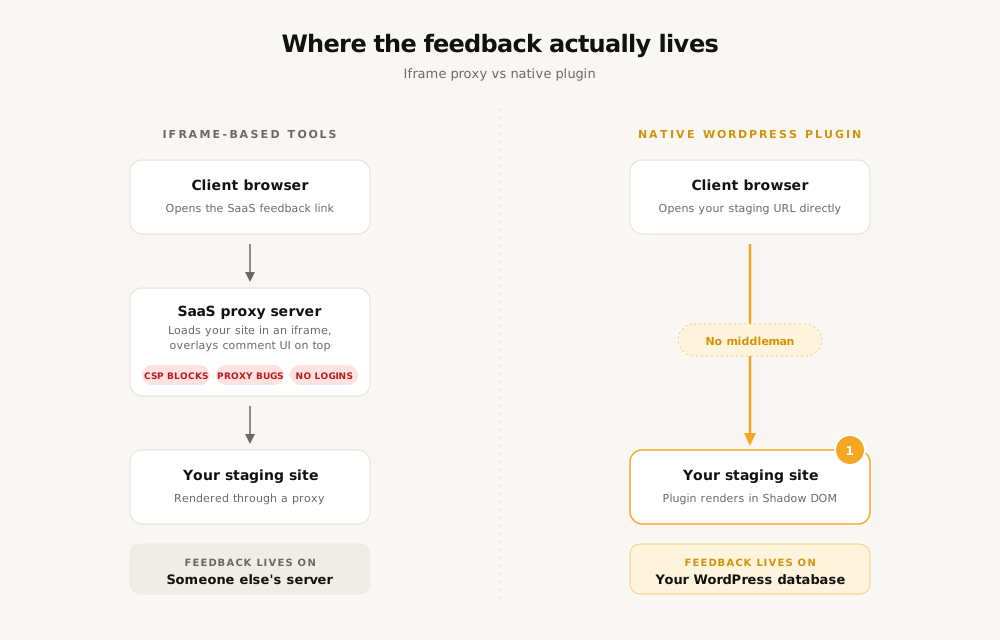
But here’s the catch nobody puts on the homepage: they all work by loading your client’s site inside an iframe on someone else’s server. Which means:
- Half the time the iframe breaks because the client’s site has a Content Security Policy that doesn’t allow it
- The “live” preview is actually a proxy that can’t replicate logged-in states, dynamic content, or anything behind a paywall
- Your client’s feedback lives on a SaaS platform you don’t control, billed per seat, forever
- When you cancel the subscription, the feedback history goes with it
- For WordPress shops specifically, you’re paying $30 to $89 a month to bolt a third-party tool onto a CMS that already has a perfectly good database sitting right there
It’s the right idea executed by people who didn’t grow up in WordPress and don’t know that “just put it in the database” is an option.
A tool worth knowing about: NotedWP
There’s a newer entry in this space that takes a genuinely different approach, and it’s worth a look if you live in WordPress: NotedWP.
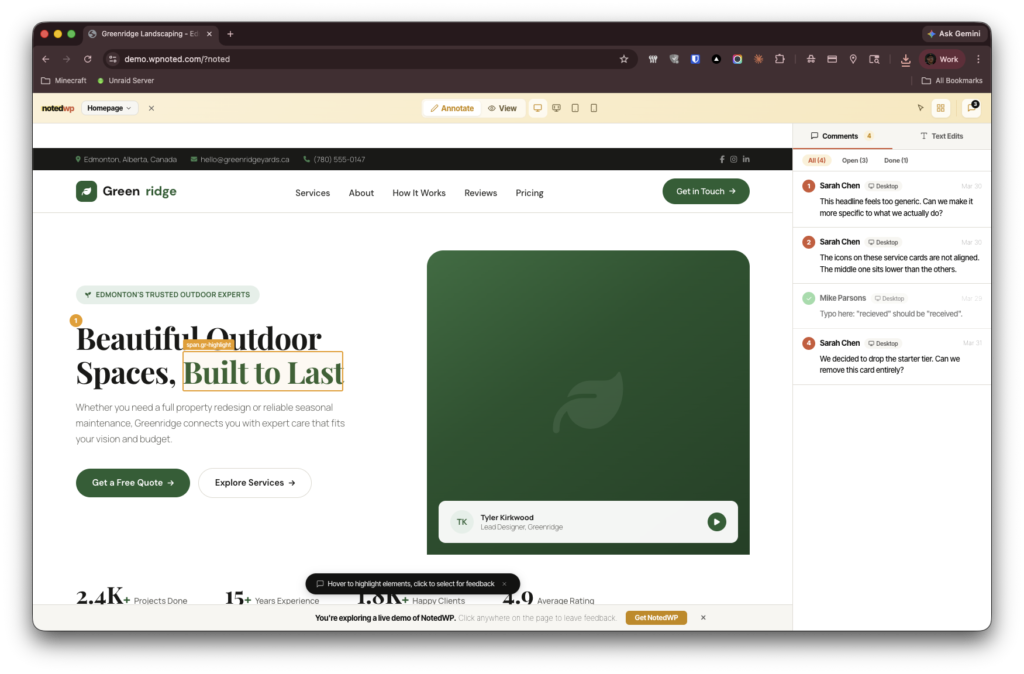
It’s not a SaaS. It’s not an iframe. It’s a WordPress plugin. You install it on the actual site you’re working on, your client gets a link, they click any element on any page, they leave a comment, and the comment lives in your WordPress database next to everything else.
That’s the whole pitch. The differences from everything else on the market are quiet but they matter:
- No iframe. Clients look at the actual live staging site, exactly as it will ship. Logged-in states work. Dynamic content works. WooCommerce checkout flows work. Membership-gated pages work.
- No CSP conflicts. Because there’s no third-party domain trying to embed the site, there’s nothing for the browser to block.
- No per-seat pricing. It’s a plugin license. Pro is $79 a year for three sites. Agency is $199 a year for unlimited. Clients don’t need an account. They don’t need to “sign up.” They click the link and start pinning.
- The data stays with the site. When the project ends, the feedback history lives in the WordPress database where it can be exported, archived, or deleted. Nobody is renting access to their own client communications.
- It looks like the site it’s on. Because it’s rendered in a Shadow DOM on the page itself, there’s no third-party branded SaaS UI sitting on top of the work.
It is, in every meaningful sense, the version of this tool a WordPress agency would build for itself if they got fed up enough.
The actual takeaway
You don’t need a better screenshot tool. You don’t need a smarter Slack channel. You don’t need to write a 4,000 word feedback policy and hope your clients read it.
You need feedback to live on the thing being reviewed, in the place where the thing being reviewed already lives, owned by the people who own the thing being reviewed.
That’s it. That’s the whole mechanic.
The chasing stops when there’s only one place to look. The translation work stops when the comment is literally attached to the element. The screenshots stop because nobody screenshots a tool that already knows what they’re pointing at.
Your Thursday afternoons are worth more than this. Go reclaim them.
NotedWP is a native WordPress plugin for visual client feedback. You can find it at wpnoted.com, check the pricing, or give it an upvote on Product Hunt.